PCからリモートするC#のソフトです。
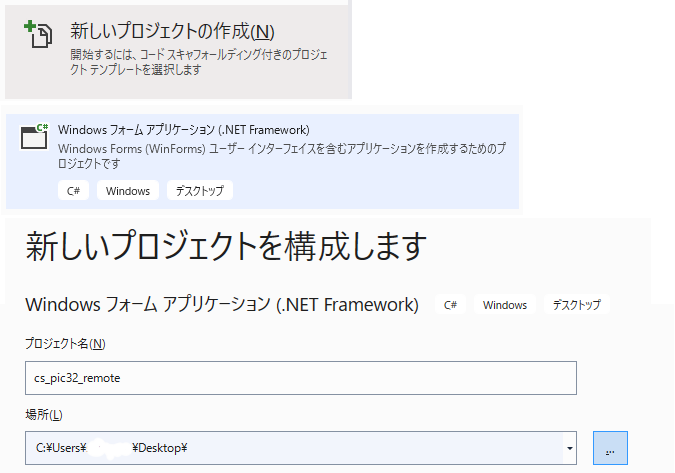
VisualStudioを使います。
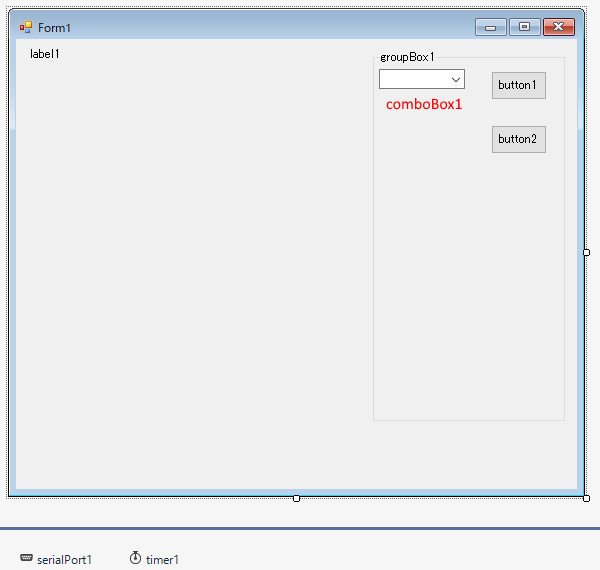
form1にツールボックスからコントロールを追加します。
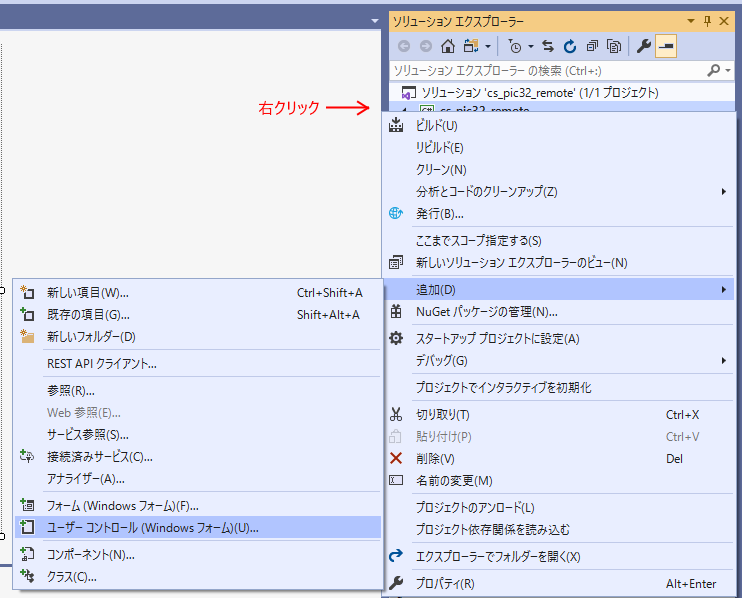
ユーザーコントロールを追加します。名前はContPanelにします。
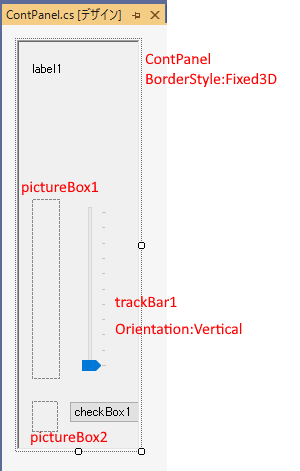
ContPanelにツールボックスからコントロールを追加します。
Form1.csのコードを全て挿げ替えます。
using System;
using System.Collections.Generic;
using System.ComponentModel;
using System.Data;
using System.Drawing;
using System.IO.Ports;
using System.Linq;
using System.Text;
using System.Threading.Tasks;
using System.Windows.Forms;
namespace cs_pic32_remote
{
//2022_0903
public partial class Form1 : Form
{
public const int Rx_Byte = 230;
public const int Tx_Byte = 128;
public const int TxData数 = 12;
public const int RxData数 = 12;
public const int 最大列車数 = 8;
public const int 列車数 = 2;
public const int SPEED_MAX = 0x3C0;
private const int 減速時スピード = 40;
private int err_count = 0;
List<train> 列車 = new List<train>();
List<ContPanel> Panel = new List<ContPanel>();
rs_data 受信データ;
class position_info
{
public int 区間;
public int 路線;
public int 方向;
public int 相;
public position_info(int 区間, int 路線, int 方向, int 相)
{
this.区間 = 区間;
this.路線 = 路線;
this.方向 = 方向;
this.相 = 相;
}
public static position_info operator +(position_info p, int n)
{
position_info ret = new position_info(p.区間, p.路線, p.方向, p.相);
if (ret.方向 == 0) ret.区間 = (ret.区間 + n) & 0b111;
else ret.区間 = (ret.区間 - n) & 0b111;
return ret;
}
public static position_info operator -(position_info p, int n)
{
position_info ret = new position_info(p.区間, p.路線, p.方向, p.相);
if (ret.方向 == 0) ret.区間 = (ret.区間 - n) & 0b111;
else ret.区間 = (ret.区間 + n) & 0b111;
return ret;
}
public void 次区間()
{
if (方向 == 0) 区間 = (区間 + 1) & 0b111;
else 区間 = (区間 - 1) & 0b111;
}
public void 前区間()
{
if (方向 == 0) 区間 = (区間 - 1) & 0b111;
else 区間 = (区間 + 1) & 0b111;
}
public void 逆転()
{
if (方向 == 0) 方向 = 1;
else 方向 = 0;
}
public position_info copy()
{
return new position_info(区間, 路線, 方向, 相);
}
public byte Byte情報
{
get { return (byte)(区間 + 路線 * 8 + 方向 * 0x80 + 相 * 0x40); }
}
public static bool operator ==(position_info c1, position_info c2)
{
if (c1.路線 == c2.路線 && c1.区間 == c2.区間)
return true;
else
return false;
}
public static bool operator !=(position_info c1, position_info c2)
{
return !(c1 == c2);
}
}
class train
{
public position_info 現位置;
public position_info 前位置;
public position_info 次位置;
public position_info 次々位置;
public float speed;
public bool 区間変化;
public bool 相変更FLAG;
public bool 安全;
public bool 逆転;
public int Power;
public bool speed_manual;
public int 設定speed;
public train()
{
//Dummyで登録(路線=7)
現位置 = new position_info(0, 7, 0, 0);
前位置 = 現位置.copy();
次位置 = 現位置.copy();
次々位置 = 現位置.copy();
}
public train(position_info 現)
{
現位置 = 現;
前位置 = 現位置 - 1;
次位置 = 現位置 + 1;
次々位置 = 現位置 + 2;
区間変化 = true;
}
public void 逆転処理()
{
//現位置を前位置に、前位置を現位置に
現位置.逆転();
前位置.逆転();
次位置 = 現位置.copy(); //前位置に入れるため
現位置 = 前位置.copy();
前位置 = 次位置.copy();
次位置 = 現位置.copy();
次位置.次区間();
次々位置 = 次位置.copy();
次々位置.次区間();
}
public void 区間変更()
{
前位置 = 現位置.copy();
現位置 = 次位置.copy();
次位置 = 次々位置.copy();
次々位置.次区間();
区間変化 = true;
}
public byte Status
{
get
{
byte ret = 0;
if (区間変化) ret = 1;
if (!相変更FLAG)
{
//相変更中は区間変更しない
if (安全) ret += 0x80;
}
//Speed Manual
if (speed_manual) ret += 0x2;
return ret;
}
}
public bool Enable
{
get
{
if (現位置.路線 == 7) return false;
else return true;
}
}
}
class rs_data
{
public int[] speed = new int[最大列車数];
public int[] power = new int[最大列車数];
public int[] 区間変化 = new int[最大列車数];
public rs_data(byte[] data)
{
if (data.Length != Rx_Byte) return;
if (data[0] != 0x55 || data[1] != 0xAA) return;//Header Check
for (int n = 0; n < 列車数; n++)
{
int pos = RxData数 * n;
//スピードメータ-
speed[n] = data[pos + 2] * 256 + data[pos + 3];
区間変化[n] = data[pos + 4];
power[n] = data[pos + 7] * 256 + data[pos + 8];
}
}
}
public Form1()
{
InitializeComponent();
}
private void button1_Click(object sender, EventArgs e)
{
//ポート接続処理
serialPort1.PortName = comboBox1.Text;
serialPort1.BaudRate = 115200;
serialPort1.Parity = Parity.None;
serialPort1.DataBits = 8;
serialPort1.StopBits = StopBits.One;
serialPort1.ReceivedBytesThreshold = Rx_Byte;
serialPort1.ReadTimeout = 500;
serialPort1.WriteTimeout = 500;
serialPort1.Open();
timer1.Enabled = true;
button1.Enabled = false;
button2.Enabled = true;
comboBox1.Enabled = false;
}
delegate void RsDelegate();
private void serialPort1_DataReceived(object sender, System.IO.Ports.SerialDataReceivedEventArgs e)
{
//データの受信はマルチスレッドで行われる為にデリゲートを使用して
//メインのスレッドでデータ処理の必要があります。
Invoke(new RsDelegate(receive_data), null);
}
public void receive_data()
{
byte[] data = new Byte[serialPort1.BytesToRead];
if (data.Length != Rx_Byte)
{
return;
}
serialPort1.Read(data, 0, data.Length);
if (data[0] != 0x55 || data[1] != 0xAA)
{
serialPort1.DiscardInBuffer();
err_count++;
return;
}
受信データ = new rs_data(data);
//label1.Text = $"{受信データ.power[0]} {受信データ.speed[0]} {err_count }";
for (int n = 0; n < 列車数; n++)
{
if (列車[n].Enable)
{
Panel[n].Speed_Meter = 受信データ.speed[n];
int pw = 受信データ.power[n] * 256 / SPEED_MAX;
Panel[n].Power_Meter = pw;
列車[n].Power = pw;
if (受信データ.区間変化[n] == 0x80)
{
if (!列車[n].区間変化)
{
//立ち上がりのみ
列車[n].区間変更();
//全ての列車の情報更新
for(int m = 0; m < 列車数; m++)
{
列車[m].区間変化 = true;
}
}
}
else
{
列車[n].区間変化 = false;
}
Panel[n].位置情報 = $"現:路{列車[n].現位置.路線} 区{列車[n].現位置.区間}," +
$"次:路{列車[n].次位置.路線} 区{列車[n].次位置.区間}," +
$"向:{列車[n].現位置.方向}";
}
}
//-----安全確認-----
for (int n = 0; n < 列車数; n++)
{
// If 列車(n).Enable Then
if (!列車[n].Enable) continue;
// Select Case 安全確認(n)
switch (安全確認(n))
{
case "停止":
列車[n].安全 = false;
列車[n].設定speed = 0;
Panel[n].信号 = "赤";
break;
case "減速":
// Dim 減速速度 As Integer = 減速時スピード '減速時のスピード
列車[n].安全 = true;
if (Panel[n].Speed_Cont > 減速時スピード)
{
列車[n].設定speed = 減速時スピード;
}
else
{
列車[n].設定speed = Panel[n].Speed_Cont;
}
Panel[n].信号 = "黄";
break;
case "安全":
Panel[n].信号 = "緑";
列車[n].安全 = true;
// If 列車[n].逆転 = 1 Then
// '逆転フラグが1なら逆転のため停止
// 列車[n].設定speed = 0
// ElseIf 列車[n].point処理状況 = p処理.通過待ち Then
// 'ポイント通過待ちのため停止
// 列車[n].設定speed = 0
// ElseIf 列車[n].yard処理状況 = y処理.Yard停止 Then
// 'Yardで停止
// 列車[n].設定speed = 0
// Remcon[n].Speed_Cont = 0
// Else
列車[n].設定speed = Panel[n].Speed_Cont;
// End If
break;
case "向合停止":
列車[n].安全 = false;
列車[n].設定speed = 0;
Panel[n].信号 = "赤";
// Remcon[n].CheckBox1.Checked = True '強制逆転
break;
}
// End Select
// Else
// Remcon[n].信号 = "灰"
// End If
//Next
}
}
private void Form1_Load(object sender, EventArgs e)
{
String[] ports = SerialPort.GetPortNames();
if (ports.Length == 0)
{
//MessageBox.Show("シリアルポートが見つかりません。");
button1.Enabled = false;
}
else
{
comboBox1.Items.AddRange(ports);
comboBox1.SelectedIndex = 0;
}
//comboBox1.Text = "COM4";
button1.Text = "接続";
button2.Text = "切断";
groupBox1.Text = "";
button2.Enabled = false; //切断ボタンdisable
label1.Text = "";
列車.Add(new train(new position_info(1, 0, 0, 0)));
列車.Add(new train(new position_info(5, 0, 0, 1)));
//DummyData
for (int n = 列車.Count; n < 最大列車数; n++)
{
列車.Add(new train());
}
for (int n = 0; n < 列車数; n++)
{
Panel.Add(new ContPanel(n));
Panel[n].Top = 25;
Panel[n].Left = Panel[0].Width * n + 2;
Controls.Add(Panel[n]);
Panel[n].逆転_Click += new EventHandler(逆転_Click);
//AddHandler Remcon(n).逆転_Click, AddressOf 逆転_Click
//AddHandler Remcon(n).ポイント_Click, AddressOf ポイント_Click
//AddHandler Remcon(n).Yard_Click, AddressOf Yard_Click
//Remcon(n).add_point(ポイント) 'リモコンにポイント番号登録
}
//位置調整
groupBox1.Top = 25;
groupBox1.Left = Panel[0].Width * Panel.Count + 50;
this.Width = groupBox1.Left + groupBox1.Width + 20;
timer1.Interval = 200;//タイマーインターバル200ms
}
// Function 安全確認(ByVal n As Integer) As String
String 安全確認(int n)
{
bool 停止 = false;
bool 減速 = false;
bool 向合停止 = false;
// For m As Integer = 0 To 列車数 - 1
for (int m = 0; m < 列車数; m++)
{
// If m<> n Then
if (m == n) continue;
// '次位置が他の列車の現、前、次位置と同じなら停止
if (列車[n].次位置 == 列車[m].現位置) 停止 = true;
if (列車[n].次位置 == 列車[m].前位置) 停止 = true;
if (列車[n].次位置 == 列車[m].次位置) 停止 = true;
// If 列車(n).point処理状況 = p処理.切替中 Then
// 'ポイント切り替え中
// If 列車(n).現位置.方向<> 列車(m).現位置.方向 Then
// If(列車(n).次位置.路線 = 列車(m).次位置.路線) And
// (列車(n).次位置.区間 = 列車(m).次位置.区間) Then 停止 = True
// End If
// Else
// If(列車(n).次位置.路線 = 列車(m).次位置.路線) And
// (列車(n).次位置.区間 = 列車(m).次位置.区間) Then 停止 = True
// End If
// '次々位置が他の列車の現、前、次位置と同じなら減速
if (列車[n].次々位置 == 列車[m].現位置) 減速 = true;
if (列車[n].次々位置 == 列車[m].前位置) 減速 = true;
if (列車[n].次々位置 == 列車[m].次位置) 減速 = true;
// If 停止 Then
if (停止)
{
// If(n > m) And(列車(n).現位置.方向<> 列車(m).現位置.方向) Then
if (n > m && 列車[n].現位置.方向 != 列車[m].現位置.方向)
{
// 向合停止 = True '方向逆で優先順位低いとき
// Return "向合停止"
return "向合停止";
}
}
}
// For Each p As 停止位置class In 車止位置
// If p.ポイント番号< 0 Then
// 'ポイントのない停止位置
// If 列車(n).現位置 = p.位置 Then
// '現位置なら停止
// 停止 = True
// Exit For
// ElseIf 列車(n).次位置 = p.位置 Then
// '次位置なら減速
// 減速 = True
// Exit For
// End If
// End If
// Next
// '通過形ヤードで空き線なしは通過不可
// For Each p As YardClass In yard
// If p.type = 1 Then
// '通過形ヤードの時
// If p.空線.Length = 0 Then
// '空線なしの時
// If (列車(n).現位置 = p.進入位置) Or(列車(n).現位置 = p.進入位置2) Then
// 停止 = True
// Exit For
// End If
// End If
// End If
// Next
// 'Yard減速
// If 列車(n).yard処理状況 = y処理.Yardポイント切替完了 Then
// 減速 = True
// End If
if (停止) return "停止";
if (減速) return "減速";
return "安全";
}
private void button2_Click(object sender, EventArgs e)
{
//ポート切断処理
timer1.Enabled = false;
serialPort1.Close();
comboBox1.Enabled = true;
button1.Enabled = true;
button2.Enabled = false;
}
private void 逆転_Click(object sender, EventArgs e)
{
int n = ((ContPanel)sender).index;
label1.Text = $"{n} cont click!";
列車[n].逆転 = Panel[n].逆転;
}
private void timer1_Tick(object sender, EventArgs e)
{
for (int n = 0; n < 列車数; n++)
{
列車[n].speed = 列車[n].設定speed;
//'逆転フラグ確認
if (列車[n].逆転)
if (列車[n].speed == 0)
if (列車[n].Power == 0)
{
//列車が停止したら逆転
列車[n].逆転処理();
列車[n].逆転 = false;
列車[n].区間変化 = true;//位置情報更新の為
// '逆転ボタン戻し
Panel[n].逆転check = false;
// Remcon(n).CheckBox1.Enabled = True
}
}
serialPort1.DiscardInBuffer();
byte[] Txdata = new byte[Tx_Byte];
//ヘッダーとして&H55,&HAAを送る
Txdata[0] = 0x55;
Txdata[1] = 0xAA;
//列車[0].speed = Panel[0].Speed_Cont;
//列車[0].speed_manual = true;
for (int n = 0; n < 最大列車数; n++)//列車.Count
{
int p = n * TxData数 + 2;
Txdata[p] = (byte)列車[n].speed;//speed data
Txdata[p + 1] = 列車[n].現位置.Byte情報;
Txdata[p + 2] = 列車[n].前位置.Byte情報;
Txdata[p + 3] = 列車[n].次位置.Byte情報;
Txdata[p + 4] = 列車[n].Status;
// Txdata(p + 5) = 列車(n).ポイント
// Txdata(p + 6) = 列車(n).yard
}
try
{
serialPort1.Write(Txdata, 0, Tx_Byte);//データ送信
}
catch (Exception ex)
{
//エラーのとき
button2.PerformClick();//切断
MessageBox.Show(ex.Message);
}
}
}
}
ContPanel.csのコードを全て挿げ替えます。
using System;
using System.Collections.Generic;
using System.ComponentModel;
using System.Drawing;
using System.Data;
using System.Linq;
using System.Text;
using System.Threading.Tasks;
using System.Windows.Forms;

namespace cs_pic32_remote
{
    //2022_0903
    public partial class ContPanel : UserControl
    {
        public int index;
        public bool 逆転;

        public event EventHandler 逆転_Click;


        public ContPanel(int id)
        {
            InitializeComponent();

            index = id;
        }

        private void ContPanel_Load(object sender, EventArgs e)
        {
            trackBar1.Maximum = 128;
            trackBar1.TickFrequency = 10;
            checkBox1.Text = "逆転";
            checkBox1.AutoSize = false;
            checkBox1.Height = pictureBox2.Height;
            checkBox1.Width = this.Width/3;

            pictureBox2.SizeMode = PictureBoxSizeMode.StretchImage;
            pictureBox2.ImageLocation = "up.png";

            //スピードメーター用
            pictureBox1.Image = new Bitmap(pictureBox1.Size.Width, pictureBox1.Size.Height);

        }


        public int Speed_Cont
        {
            get { return trackBar1.Value; }
            set { trackBar1.Value = value; }
        }

        public String 位置情報
        {
            set
            {
                String[] items =value.Split(',');

                label1.Text = $"{items[0]}\n{items[1]}";


                if (items[2] == "向:0")
                {
                    if (pictureBox2.ImageLocation == "down.png")
                        pictureBox2.ImageLocation = "up.png";
                }
                else
                {
                    if (pictureBox2.ImageLocation == "up.png")
                        pictureBox2.ImageLocation = "down.png";
                }
            }
        }

        //    Public WriteOnly Property Speed_Meter() As Integer  'Speed メーター
        public int Speed_Meter
        {
            set
            {
                int speed_max = 256;
                int sp = pictureBox1.Height - value * pictureBox1.Height / speed_max;

                Graphics g = Graphics.FromImage(pictureBox1.Image);
                g.Clear(Color.White);

                Pen pen = new Pen(Color.Red, 3);
                Brush brush = Brushes.Pink;
                Point p1 = new Point(0, sp);
                Point p2 = new Point(pictureBox1.Width, sp);
                Rectangle rect = new Rectangle(p1, new Size(pictureBox1.Width, pictureBox1.Height - sp));

                g.FillRectangle(brush, rect);

                //pictureBox1.Refresh();
            }
        }
        public int Power_Meter
        {
            set
            {
                int speed_max = 256;
                int sp = pictureBox1.Height - value * pictureBox1.Height / speed_max;

                Graphics g = Graphics.FromImage(pictureBox1.Image);

                Pen pen = new Pen(Color.Red, 3);
                Point p1 = new Point(0, sp);
                Point p2 = new Point(pictureBox1.Width, sp);

                g.DrawLine(pen, p1, p2);

                pictureBox1.Refresh();
            }
        }

        public String 信号
        {
            set
            {
                switch (value)
                {
                    case "緑":
                        label1.BackColor = Color.LightGreen;
                        break;
                    case "黄":
                        label1.BackColor = Color.Yellow;
                        break;
                    case "赤":
                        label1.BackColor = Color.LightPink;
                        break;
                    case "灰":
                        label1.BackColor = Color.LightGray;
                        break;
                }
            }
        }

        private void checkBox1_CheckedChanged(object sender, EventArgs e)
        {
            逆転 = checkBox1.Checked;
            逆転_Click(this, EventArgs.Empty);
        }

        public bool 逆転check
        {
            set { checkBox1.Checked = value; }
        }
    }
}
プロジェクトのフォルダーの bin Debug に


この2つのpngを入れます。
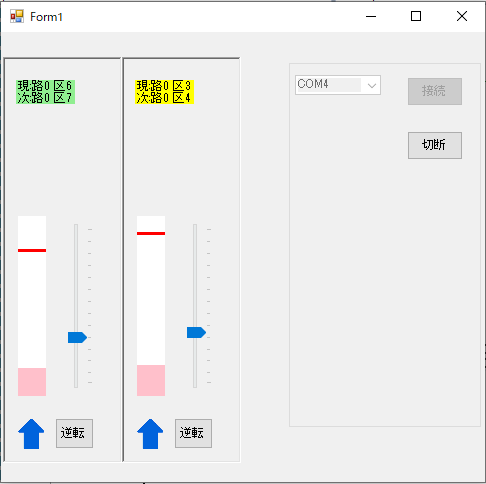
実行して接続するとこうなります。最初の列車の位置は区間1と区間5です。
逆転を押すと、スピードを下げて0になった時に方向が逆転します。